Exploring the Depth of 3D Sea Shell SVG in Modern Design
When you think of sea shells, you likely picture the smooth ridges of a scallop or the spiral of a conch held to your ear. Now imagine translating that tactile, layered form into a digital file that scales to any size without losing quality. That is where the 3D Sea Shell SVG enters the creative landscape. Unlike flat, two-dimensional icons, these files use shading, gradients, and strategic layering to create the illusion of depth, making them a powerful asset for designers, crafters, and developers alike.
SVG, or Scalable Vector Graphics, has long been a favorite for web and print projects because it remains crisp at any resolution. Adding a three-dimensional quality to an SVG introduces a new set of possibilities. A 3D Sea Shell SVG captures not just the outline of a shell but also its curves, shadows, and highlights. This allows you to place a shell in a digital scene and have it look like it occupies real space, whether you are designing a beach-themed website, a mobile app icon, or a vinyl decal for a physical product.
How 3D Sea Shell SVGs Differ from Standard Vector Graphics
At first glance, you might wonder what separates a regular shell vector from one that claims to be three-dimensional. The difference lies in how the file is constructed. A standard SVG might use a single flat color or a simple gradient to represent a shell. A 3D Sea Shell SVG, on the other hand, typically employs multiple overlapping paths, each with its own gradient or opacity setting, to simulate form.
Consider the spiral of a nautilus shell. In a flat vector, you see a curve. In a 3D version, you see that curve wrap around a central axis, with darker tones on the underside and lighter highlights catching the outer edge. The result feels tangible. Designers achieve this through techniques such as:
- Multi-layered shading – separate shapes for highlights, midtones, and shadows are stacked to build depth.
- Radial and linear gradients – these mimic light hitting a curved surface, giving the shell a rounded appearance.
- Overlapping elements – parts of the shell appear to sit in front of or behind other parts, reinforcing the sense of space.
- Drop shadows and inner glows – subtle effects that make the shell feel like it is resting on a surface or has thickness.
This approach means that a single 3D Sea Shell SVG can be used in contexts where photorealism is not required but dimensional presence is. It bridges the gap between flat illustration and full 3D rendering, offering a lightweight, scalable alternative that loads quickly on the web and cuts cleanly on a vinyl plotter.
Practical Benefits for Designers and Developers
Working with a 3D Sea Shell SVG comes with several concrete advantages, especially when you compare it to using raster images or full 3D model files. One of the most immediate benefits is file size. A high-resolution PNG of a shell with realistic shading might be several megabytes. A well-optimized SVG with 3D effects often comes in at just a few kilobytes. This makes it ideal for web use where load times and bandwidth matter.
Another advantage is editability. Because the file is made of vectors, you can change colors, adjust shading, or resize elements without degrading quality. If your brand uses a specific palette, you can open the 3D Sea Shell SVG in a vector editor like Inkscape or Adobe Illustrator and recolor the highlights and shadows to match. You are not stuck with a fixed image. You can also extract individual components of the shell, such as the inner spiral or the outer lip, and reuse them in other design elements.
Scalability is also critical. That same shell used as a small icon on a navigation bar can be scaled up to become a hero image on a landing page, and it will look equally sharp at both sizes. This flexibility saves time because you do not need to create multiple versions of the same asset. For responsive web design, this is particularly valuable because the shell can adapt to different screen sizes without any loss of fidelity.
Use Cases Across Different Industries
The versatility of a 3D Sea Shell SVG means it appears in a surprisingly wide range of projects. Here are a few scenarios where these files shine:
Web and UI design. Beach resorts, marine biology blogs, seafood restaurants, and ocean conservation sites all benefit from visual elements that feel immersive. A flat shell icon might work, but a 3D shell adds a premium, polished feel. It can be used as a button icon, a decorative divider, or a loading animation element. Because SVGs support interactivity, you can even code the shell to rotate or change color on hover using CSS, creating an engaging user experience.
Print and packaging. Business cards, postcards, product labels, and brochures often feature shells as part of a coastal theme. A 3D Sea Shell SVG ensures that the printed result looks crisp, whether it is screen-printed on a t-shirt or offset-printed on a glossy brochure. The dimensional shading helps the shell stand out on paper, especially when combined with spot gloss or foil stamping.
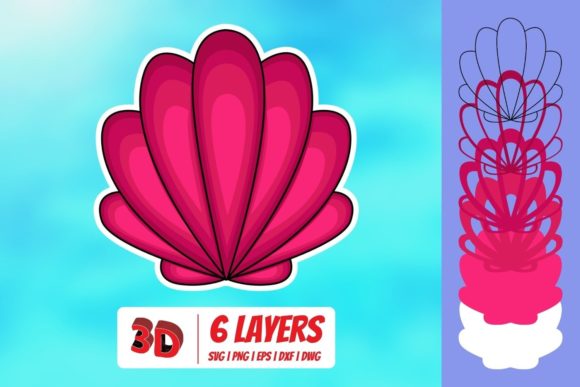
Crafting and DIY projects. Vinyl cutting machines like Cricut or Silhouette rely on SVG files for precision cutting. A 3D Sea Shell SVG with clearly defined layers allows crafters to cut each shade separately and assemble them into a layered paper or vinyl piece. This is popular for scrapbooking, card making, wall decals, and even fabric appliqué. The result is a handmade item that looks professionally produced.
Game development and app assets. In mobile games or educational apps, a 3D shell can serve as a collectible item, a button, or a background decoration. Because SVGs are lightweight, they do not bog down performance, and they can be easily re-skinned for different themes or difficulty levels.
Factors to Consider When Choosing a 3D Sea Shell SVG
Not all 3D Sea Shell SVG files are created equal. As you evaluate options, whether you are downloading free assets or commissioning custom work, there are several characteristics to examine.
Layer structure. A good 3D SVG will have a clean layer hierarchy. Each shadow, highlight, and base color should be on its own logically named layer. This makes editing straightforward. If you open a file and see a single merged path with no distinguishable components, you will struggle to customize it. Look for files that are built with organization in mind.
Gradient quality. The gradients used should be smooth and appropriate for the light source. Abrupt transitions or overly dark shadows can make the shell look artificial. Test the file by scaling it up to see if the gradients remain smooth or if they become banded. Quality SVGs avoid banding by using enough gradient stops.
File validity. Occasionally, SVGs downloaded from the web contain code that references external fonts or uses unsupported features. Before using a 3D Sea Shell SVG in a critical project, validate that it renders correctly in your target applications. Open it in a browser, a vector editor, and your design software to ensure consistency.
Licensing and usage rights. Many free SVGs come with restrictions, such as requiring attribution or prohibiting commercial use. If you plan to use the shell on a product you sell, double-check the license. Paid assets typically offer broader usage rights and often come with better construction.
Customizing a 3D Sea Shell SVG for Your Brand
One of the most rewarding aspects of working with vector graphics is the ability to customize them. With a 3D Sea Shell SVG, you are not limited to the original colors or arrangement. Here is how you can make it your own.
Start by opening the file in a vector editor. Identify the light source. In most 3D SVGs, the light comes from the upper left. If you want to change the color of the shell, adjust the base color first, then modify the highlight and shadow layers to maintain the illusion of depth. A simple trick is to use a lighter tint of your base color for highlights and a darker tint for shadows, rather than using pure white or black. This keeps the shell looking cohesive.
You might also consider splitting the shell into its component parts if the SVG allows it. For example, you could isolate the inner spiral and use it as a separate graphic element on another page. You can also combine multiple 3D Sea Shell SVG files into a composition, arranging them as if they are scattered on a beach. Because each shell is three-dimensional, the composition will have a realistic sense of depth, especially if you layer them with slight offsets and drop shadows.
Recommendations for Integrating 3D Sea Shell SVGs into Projects
Based on common workflows and feedback from designers, here are a few practical recommendations for getting the most out of these assets.
For web use, embed the SVG inline rather than as an image source. Inline SVGs allow you to control individual elements with CSS and JavaScript. You can animate the shell to gently rock back and forth or to change color when the user scrolls. This adds a layer of interactivity that static images cannot match.
For print, convert the SVG to a CMYK color space before sending it to the printer. While SVGs are typically created in RGB, most print shops prefer CMYK. You can do this conversion in your vector editor. Also, check that the gradients do not lose their smoothness in the conversion. If they do, consider simplifying the gradient stops.
For crafting, ensure that the 3D Sea Shell SVG you choose has distinct layers that can be cut separately. Some files come pre-split into layers for different colors of vinyl or paper. If not, you may need to manually separate the paths. Also, verify that the file is scaled to the correct dimensions for your cutting machine. Many crafters forget to check scale and end up with a shell that is unexpectedly tiny or huge.
For mobile apps, test the SVG rendering on different devices. Some older Android browsers do not support all SVG features. If you are using advanced gradients or filters, provide a fallback image or simplify the SVG for lower-end devices. A 3D Sea Shell SVG that uses only standard gradient types will have the widest compatibility.
Where to Find High-Quality 3D Sea Shell SVGs
Several sources offer well-constructed 3D Sea Shell SVG files. Marketplaces like Creative Market, Envato Elements, and Etsy have extensive collections created by professional vector artists. Look for files that include preview images showing the shell in various sizes and contexts. This gives you a sense of how the shading holds up at different scales.
Free resources such as SVG Repo, Freepik, and Openclipart also offer shell graphics, but the quality and depth of the 3D effect can vary widely. When downloading free files, inspect them closely in a vector editor before committing to a project. You may need to rebuild some shadows or adjust gradients to achieve a convincing three-dimensional look.
If you have specific requirements, consider commissioning an original 3D Sea Shell SVG from a freelance designer. This ensures that the shell matches your exact vision, whether you need a rare species, a specific angle, or a particular color palette. Custom files also come with clean, editable layers and full commercial rights.
Ultimately, the 3D Sea Shell SVG is a tool that blends the best of vector precision with the visual appeal of depth. Whether you are building a website, designing a logo, crafting a physical product, or developing an app, these files offer a lightweight, scalable, and customizable way to bring the beauty of seashells into your work. By understanding their structure, evaluating their quality, and tailoring them to your needs, you can achieve results that feel both polished and natural.